EIOBoard Outlook Add-In
- Supports Outlook 2000 or higher
- Viewable within Microsoft Outlook
- Movable status view screen
- Simple navigation bar added to the top menu
- Synchronize with your Outlook calendar
- Telephone integration with auto status change
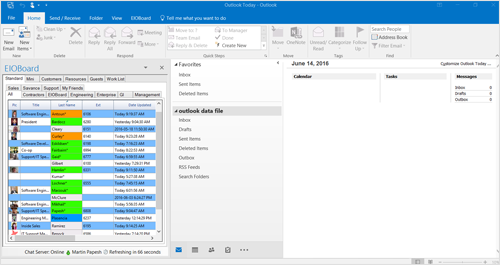
Main Outlook Add-In
EIOBoard's Outlook Add-in was designed after our popular Application Interface. The Microsoft Outlook in/out board solution has the same features as the EIOBoard Application version, and accessible right from Outlook. Our approach was to keep the same look of Outlook but integrated our movable Status Board right into Microsoft Outlook.
You can quickly see the status of your entire company while checking your email. Our customers have found the Outlook Add-in very convenient and easy to use without having to open any additional screens to update and view their status.
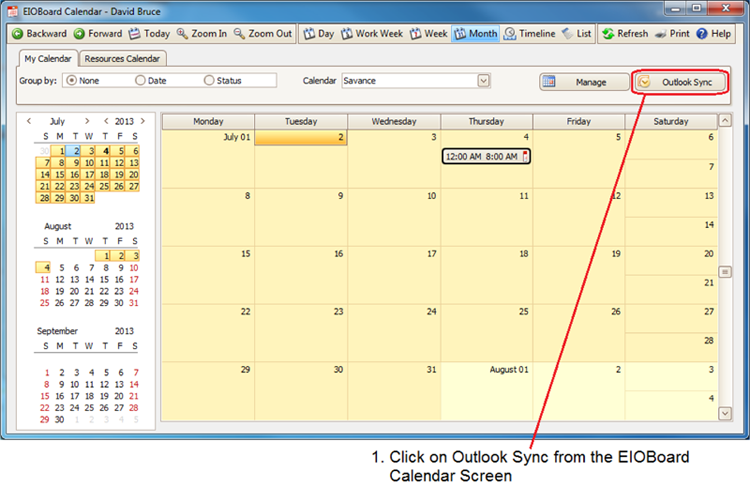
Synchronization to Outlook Calendar
The Outlook Add also can synchronization all your appointments and events automatically or when you choose and add them to EIOBoard with ease! EIOBoard Calendar allows users to see all the events and appointments for the day, week, or month. The list view allows you to see all your events or Appointments with details. You can also view and manage all your resources.
By using the Outlook Add-in users do not need to update their status in multiple locations, or open other applications or screens, thus saving time and efforts. The Add-in provides a quick shortcut to your company's electronic in out board.
Telephone Integration
 |
Telephone Integration
We have integrated a Telephone Status feature right into our Outlook Add-in. EIOBoard Telephony Application Programming Interface (TAPI) automatically changes your status to "On The Phone" when you're on a call. You can also add "Caller ID" information to your comments to indicate who you are speaking with. Now a call center or secretary can see who is on the phone instantly, and send a message with our notes feature, quickly send a chat to the person notifying them of the call, or transfer the call.